5 Easy Ways to Use AI
AI is everywhere.
And so are the countless posts and podcasts telling you how to get started.
The only problem is that almost all of them start with a disclaimer about how long it’s going to take you to “get good at it”. You need to try things out. You need to iterate. You need to learn and discover and rethink how you do things. But don’t worry…it’ll be fun!

Now don’t get me wrong — I think everyone (especially founders) should carve out time to learn and discover and understand how AI works in its current form. But even if you become a Level 80 Prompt Engineer, you still only have so many hours in the day to actually build things with AI.
A few years ago, I shared 5 new habits for the new year (which is still a relevant post). Today, I’m going to share 5 easy ways you can use AI right now. Even if you’ve never written a single prompt.
Every single one of these will deliver immediate ROI for you and/or your business. And they’re all things that I’m personally using.
1. AI for Scheduling
There was a time not so long ago when x.ai wasn’t one of Elon Musk’s many companies but, instead, was a small, New York-based startup trying to build an AI-powered personal assistant. At a time when virtual assistants were all the rage, the promise of “Amy” was alluring. Here was the description of x.ai from their launch announcement back in 2014:
Getting copied in triggers Amy (full name: Amy Ingram, apparently) to read the email, look for date and time and place suggestions and then continue to the conversation directly with the other person to find a time and place that works for everyone — and then put the detail into your diary.
The idea here is that rather than taking up your time, or other people’s time, scheduling these meetings, you can use Amy to do it all for you. “Anything which a human PA could add to a traditional meeting invite she can do,” co-founder and CEO Dennis Mortensen tells me.
It sounded amazing. Unfortunately, it didn’t actually work (I was an early beta user).
Fast forward 10 years and I had the opportunity to beta test another AI-powered personal assistant from another small startup called Howie.ai. This new startup had a very similar-sounding value proposition:
Howie manages your calendar with the finesse of a world-class EA and the precision of a bleeding-edge AI.
The difference? Howie works.
I’ve been using Howie.ai for about 6 months now and I’ve found it to be better at scheduling than any human EA/VA I’ve had before. That may sound crazy, but the degree to which you can fine-tune it is unbelievable. It remembers nuanced instructions that a normal human would forget. And it automatically reaches out when it needs additional information or finds a conflict in your schedule.
Howie doesn’t currently do anything other than scheduling (so it won’t replace an EA/VA for other tasks), but it is really, really good at scheduling. If you’ve ever interacted with “Max” to setup a time to talk with me, you’ve actually been interacting with AI 😉.

My next few days according to Howie
(I’m not an investor in Howie, just a really big fan. If you want to try it, you can use this link to get $20 off any plan.)
2. AI for Remembering
There is one aspect of my experience navigating Startupland™ as an investor that fills me with shame. Despite my best efforts, chances are I have absolutely no idea who you are. AI transcription has changed that for me.
There are plenty of AI notetakers on the market. Most of them focus on a straightforward use case: transcribing online video calls and saving them…somewhere.
If I’m being honest, I haven’t personally found a huge lift from AI notetaking on its own. Sure, it saves me a bit of time typing and conceptually allows me to be more present in conversations, but I grew up in an era where typing was a mandatory class in high school, so I’m used to typing and talking at the same time. Add to that the fact that most AI notetakers have limited / buggy / work-in-progress integrations with CRMs and other software platforms and it often felt like it took more effort to use them than to just take the notes myself.
But then they started to introduce querying capabilities — and that changed the game (at least, for me).
Several times each week, I’ll get ready to join a meeting and realize that I don’t recognize the name of the person I’m meeting with or can’t recall how we met / what the meeting is about. Instead of scrambling or sheepishly asking the person what we’re supposed to be talking about, I can now ask Granola questions like:
Where did we meet?
What did we talk about last time we had a call?
Has this person’s name come up in other calls that I’ve had?
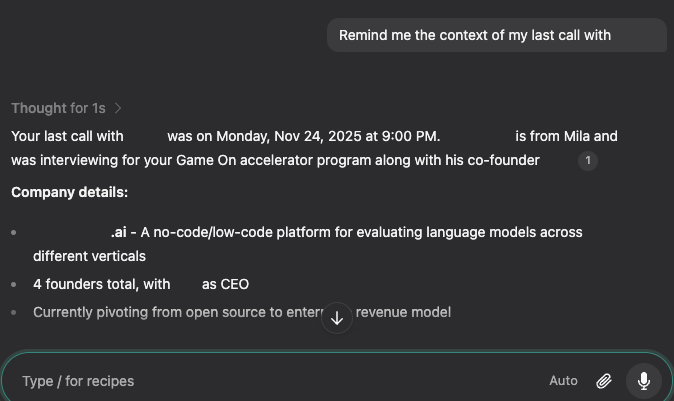
For as much flak as Cluely got for their “cheat on everything” positioning, the underlying insight was a prescient one. We now have the ability to augment our knowledge and memories in real-time, which is an incredible power-up as a founder.
3. AI for Data Entry
Data entry is the bane of every tech worker’s existence (and I say that as someone who made his mark in the database / data analytics industry). It’s tedious, time-consuming and error prone.
AI has helped me eliminate a surprising amount of manual data entry, not only at work but in my day-to-day life (which means less time doing data entry and more time doing…anything else).

Here’s a simple example: adding flight details to my calendar.
I’m a picky traveller and generally book my own flights (even when I work with an EA/VA). Whenever I book a flight, I have to add details to one or more calendars. That might not sound like a big deal, but each one takes a few minutes — potentially more if you’re like me and like to have your calendar entries in a particular format, complete with flight details and booking references.
Google has tried to automate this for awhile (by scanning emails and adding flight details to Google Calendars), but the way it creates calendar entries is problematic. Not to mention the fact that it’s inconsistent. Modern AI solves this.
I can now forward any email confirmation / itinerary to Howie.ai with a simple note: “add to <x> calendar” and have a corresponding entry added to my calendar(s) in the exact format I prefer. It can also invite other people or add entries to shared calendars. That might sound trivial, but it saves me anywhere from 20 minutes to an hour each month. That’s meaningful.
And all I had to do to set this up was send a single email to Howie describing the format I like for my calendar entries.
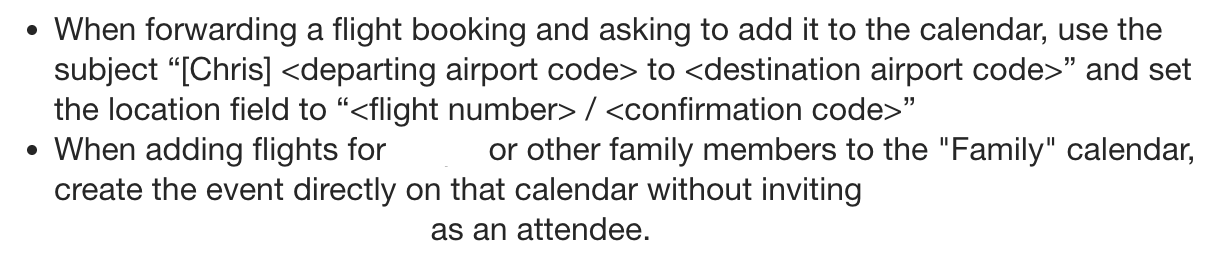
The internal rules Howie created based on my email request
I’ve found similar gains using AI agents for CRM data entry, expense reporting, and other, similar “small tasks” that multiply over time.
4. AI for Statistics
There are a lot of situations in Startupland™ that require statistics: pitch decks, conference talks, blog posts, etc.
In the course of my work and writing, I often find myself wondering about a variety of statistics — for example, how many VCs in a particular geography have technical degrees?
In the past, the best I could do was to query Google in the hope of finding someone who had researched and written about the particular stat I was interested in. More often than not, nobody had — which meant that after a few queries it was time to give up (either that, or go way down a rabbit hole desperately searching for the result I wanted).
Thanks to AI reasoning / deep research models, it’s now possible to ask an AI agent to go out and derive almost any statistic imaginable in an easy, cost-efficient manner.
For a long time I’ve had a hypothesis that a difference in the backgrounds of early-stage VCs in Silicon Valley and other parts of the world was responsible for some of the behaviors that we often dismiss as “risk aversion”. AI deep research tools allowed me to uncover what it was: the percentage of VCs in Silicon Valley who have technical degrees is significantly higher than in other parts of the world.
It also allowed me to debunk a commonly-held myth: that more VCs in Silicon Valley have entrepreneurial experience than VCs in other parts of the world (the ratio is almost identical).
And all of this took just a few minutes of querying ChatGPT with its reasoning model (o3) activated.

It turns out that Star Trek IV wasn’t that far off
To be clear: the statistics that these tools come up with generally aren’t scientifically accurate (unless they find the result in a peer-reviewed academic publication). But in my experience, the insights and “directional correctness” that they provide — along with the ability to easily fact-check the underlying data sources — is an unprecedented game-changer (and one that I use multiple times each week).
5. AI for Media
There have already been plenty of cultural flashpoints involving the intersection of AI and media (believe it or not, it was less than a year ago that the world was briefly obsessed with reimagining images “in the style of Studio Gibli”). But rather than share all of the things you could do with AI, I’m going to share a few of the things I actually do on a regular basis:
Images for Blog Posts, Websites and Event Announcements
Old
Spend hours searching Google to try to find the perfect image
Pay stock photography companies for generic looking images that are “good enough”
Hire someone to create the “perfect” image that probably costs way more than it’s worth
New
Spend a few minutes max searching Google for the perfect image (in particular, when I’m looking for memes for my blog posts)
Spend a few minutes prompting AI to create the perfect image (e.g. for a Canadian VC holiday dinner that I’m hosting)

“Create an image showing a group of moose, loons and beavers wearing red and black plaid patagonia vests holding glasses of red wine around a table at an old school mahogany steakhouse with a Christmas tree in the background”
Video Editing
Old
Spend hours manually editing videos on iMovie or similar
Pay a video editor way-too-much money to do the work for me
New
For simple videos (e.g. “walk-and-talks”), use free tools like Adobe Express to instantly add captions and make basic edits
For more involved videos, use an AI video editor like Descript to quickly-and-easily create and edit the video
Pay a video editor a very reasonable amount of money to do the work for me, knowing that they’re just turning around and using AI tools themselves
Have you checked out my YouTube channel yet?
Music and Sound for Videos
Old
Use boring, generic, open source or licensable music / sound clips and manually edit to (hopefully) fit the video
Use short clips of popular songs and hope you don’t get an automated takedown notice
New
Subscribe to audio platforms like Epidemic Sound (which license music and sound clips from a variety of artists specifically for use in online videos)
Use their AI-driven tools to create derived sounds clips that include specific parts of songs at specific durations
I created the background music for the Game On launch video in about 30 minutes while on a flight
Every single one of these you can get started using instantly, without needing to learn how to be a prompt engineer (so no more AI intimidation!). I personally think that specialized tools like these will be the “gateway drug” for many people who want to leverage AI, but don’t know where to start.
And when you’re ready to go deeper, check out this excellent post by Charles Hudson about how Teaching AI to Think Like Me Made Me Rethink How I Think.